Posts

Set Google as IE 11 default search provider

Image
Create a new GPO and navigate to User Configuration->Preferences->Windows Settings-> Registry. Generate a GUID for the registry key you are about to create Create the "DefaultScope" Registry Key with the GUID as the value data. Copy this key and then add the GUID and remove the Value name Copy and paste this key now 5 times so you should have the following 6 keys Update each key with the following Value names and Value Data:- Value Name Type Value Data DisplayName Google FaviconURL https//:google.com/favicon OSDFileURL https://microsoft.com/en-us/IEGallery/Google ShowSearchSuggestions REG_DWORD 00000001 SuggestionsURL http://clients5.google.com/complete/search?q={searchTerms}&client=ie8&mw={ie:maxWidth}&sh={ie:sectionHeight}&rh={ie:rowHeight}&inputencoding={inputEncoding}&outputencoding={outputEncoding} URL http://w...
Force MSI install command

If you have an application that cannot be installed due to an existing install that has been broken in some way, try running the following command as a last resort:- msiexec.exe /fvecmus The command allows the MSI to install over the top of the old application that is stopping the install from completing.

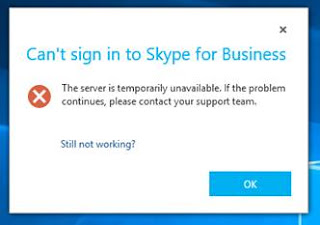
Cant sign in Skype for Business

Image
The following error is displayed when launching Skype for business       Can't sign in to Skype for business – The server is temporarily unavailable. If the problem continues, please contact your support team. This issue maybe caused (in my case) due to the firewall blocking sipfed.online.lync.com:5061 https://technet.microsoft.com/en-us/library/gg398833.aspx You can test to see if the port is open or closed using telnet. A successful test will look as follows:-

MSI Packaging - ESRI ArcGIS plugins for All Users

Image
ESRI ArcGIS plugins Issue – When installing ESRI ArcGIS plugins they only install for the current user, in an enterprise deployment these plugins should install for all users automatically. Plugins solution has been tested with:- PetroGIS 1.6 Team-GIS Manual Install Normally when you have AcrGIS installed you will be asked the following when you click on a ArcGIS add-in file:- File will have association set by ArcGIS install If you click on file you will see the following install screen:- The install will then create the following file and folder:- C:\Users\username\Documents\ArcGIS\AddIns\Desktop10.0\{e7f903e3-0ce4-4e3a-88a0-e05042dfeee7} These plugins are automatically loaded on starting ArcGIS 10. How to package for multiple users To package for multiple users active setup will have to be used to replicate the ESRI Addin File for each user that logs on to the workstation. The key here is to note the folder name above as this will have ...

Remove Folder during MSI Install

Image
Remove Folder during MSI Install Create a custom action      cmd.exe /C rmdir "%PROGRAMDATA%\Microsoft\Windows\Start Menu\Programs\Java" /S /Q Change the Type to 3122 No Impersonate runs the command in a system context. Source is %COMSPEC The ComSpec environment variable by default points to the full path of the command line interpreter. Now you have to sequence the command to run second last just before InstallFinalize Easy as that.

Microsoft Power BI Silent install

Image
Microsoft Power BI Desktop If you try and install the MSI silently then you will come across the following error:- GPO Deployment with have a 1603 ERROR To install silently you will need to create a MST, with the following items added:- Done.

.NET 4.5.2 MSI

Image
Create .NET 4.5.2 MSI   Download .NET 4.5.2 and extract setup.exe using 7 zip.   Run the following Msiexec /a "C:\PATHtoMSI" EXTUI=1 TARGETDIR=C:\AIP   Example:-     Note - "EXTUI=1" --> Makes solo MSI install possible     You will now have an AIP directory with the following files:-       Create a MST called Netfx_Full_LDR_x86.mst and make the following change (Using InstEd MSI editor):-         Now you can deploy .NET 4.5.2 using the following command:-    msiexec /I Netfx_Full_LDR_x86.msi TRANSFORMS=Netfx_Full_LDR_x86.mst /q   :-)
